一键登录 更安全快捷
获取验证码
密码登录
验证码登录
登录

 0
收藏
0
收藏
VCSA 的 HTTPS 自签证书过期是运维中常见故障,会直接导致登录界面异常、无法正常访问管理控制台,影响虚拟化环境运维。本文聚焦这一核心问题,提供步骤清晰、实操性强的解决方案,涵盖证书更新、配置验证等关键环节,帮助运维人员快速排查故障、恢复 VCSA 正常使用,适合有基础运维经验的技术人员参考。
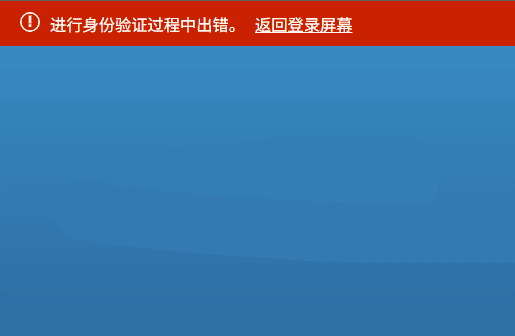
异常情况:当前使用的是VCSA6.7版本,在登录VCSA系统后提示“进行身份验证过程中出错。返回登录屏幕”,已确认用户名和密码没有问题.
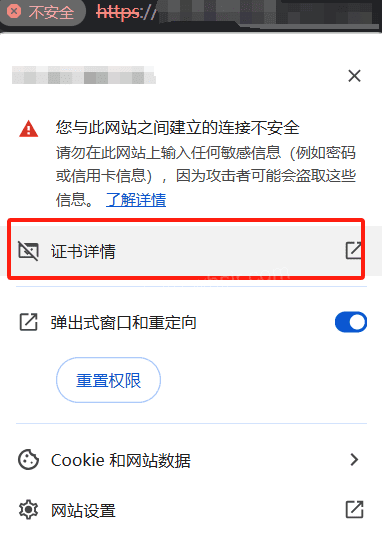
验证是否是证书问题导致,可通过浏览器查看证书,发现已过期
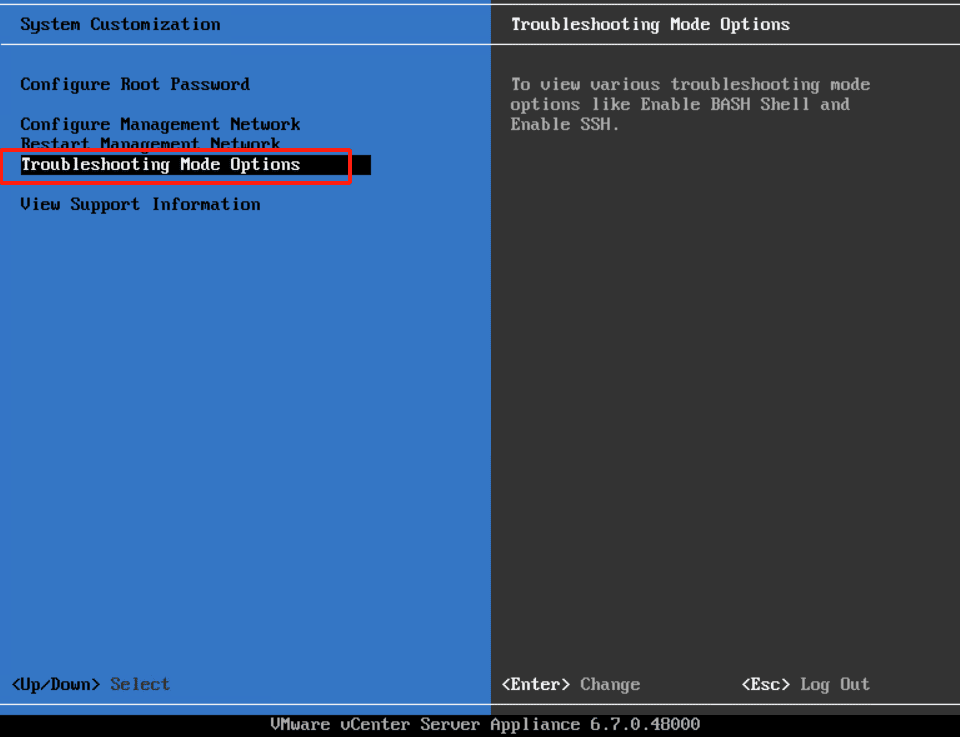
在VCSA系统中按F2登录后选择“Troublesbooting Mode Options”,然后开启ssh
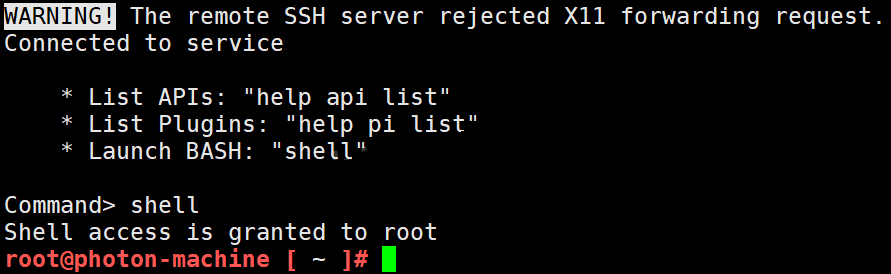
远程登录ssh服务器
如果你不会从浏览器看证书是否过期,也可以在shell登录后,通过执行以下命令,确认证书是否过期
for store in $(/usr/lib/vmware-vmafd/bin/vecs-cli store list | grep -v TRUSTED_ROOT_CRLS); do echo "[*] Store :" $store; /usr/lib/vmware-vmafd/bin/vecs-cli entry list --store $store --text | grep -ie "Alias" -ie "Not After";done;
[*] Store : MACHINE_SSL_CERT
Alias :	__MACHINE_CERT
            Not After : Apr 20 06:10:29 2025 GMT
[*] Store : TRUSTED_ROOTS
Alias :	5d651a93acd2178048ef7fb49e66a00f10ea7d44
            Not After : Dec  6 02:18:55 2030 GMT
[*] Store : machine
Alias :	machine
            Not After : Apr 20 06:10:54 2025 GMT
[*] Store : vsphere-webclient
Alias :	vsphere-webclient
            Not After : Apr 20 06:10:57 2025 GMT
[*] Store : vpxd
Alias :	vpxd
            Not After : Apr 20 06:10:59 2025 GMT
[*] Store : vpxd-extension
Alias :	vpxd-extension
            Not After : Apr 20 06:11:01 2025 GMT
[*] Store : APPLMGMT_PASSWORD
[*] Store : data-encipherment
Alias :	data-encipherment
            Not After : Dec 11 02:12:20 2022 GMT
[*] Store : SMS
Alias :	sms_self_signed
            Not After : Dec 11 02:24:27 2030 GMT
[*] Store : BACKUP_STORE_H5C
Alias :	bkp__MACHINE_CERT
            Not After : Apr 20 07:11:56 2023 GMT
Alias :	bkpmachine
            Not After : Apr 20 07:12:27 2023 GMT
Alias :	bkpvsphere-webclient
            Not After : Apr 20 07:12:29 2023 GMT
Alias :	bkpvpxd
            Not After : Apr 20 07:12:31 2023 GMT
Alias :	bkpvpxd-extension
            Not After : Apr 20 07:12:33 2023 GMT
我这里已确认证书过期,所以我这里要进行证书续期操作
执行以下证书续签操作命令
/usr/lib/vmware-vmca/bin/certificate-manager
注:很多人可能卡在续签证书这一步,请参照我这里的提示进行操作,如有快照,尽可能的先快照备份下。
_ _ _ _ _ _ _ _ _ _ _ _ _ _ _ _ _ _ _ _ _ _ _ _ _ _ _ _ _ _ _ _ _ _ _
| |
| *** Welcome to the vSphere 6.7 Certificate Manager *** |
| |
| -- Select Operation -- |
| |
| 1. Replace Machine SSL certificate with Custom Certificate |
| |
| 2. Replace VMCA Root certificate with Custom Signing |
| Certificate and replace all Certificates |
| |
| 3. Replace Machine SSL certificate with VMCA Certificate |
| |
| 4. Regenerate a new VMCA Root Certificate and |
| replace all certificates |
| |
| 5. Replace Solution user certificates with |
| Custom Certificate |
| |
| 6. Replace Solution user certificates with VMCA certificates |
| |
| 7. Revert last performed operation by re-publishing old |
| certificates |
| |
| 8. Reset all Certificates |
|_ _ _ _ _ _ _ _ _ _ _ _ _ _ _ _ _ _ _ _ _ _ _ _ _ _ _ _ _ _ _ _ _ _ _|
Note : Use Ctrl-D to exit.
Option[1 to 8]: 8
Do you wish to generate all certificates using configuration file : Option[Y/N] ? : n
Please provide valid SSO and VC privileged user credential to perform certificate operations.
Enter username [[email protected]]: 输入VCSA用户名
Enter password: 输入VCSA用户密码
Please configure certool.cfg with proper values before proceeding to next step.
Press Enter key to skip optional parameters or use Default value.
Enter proper value for 'Country' [Default value : US] : 默认回车
Enter proper value for 'Name' [Default value : CA] : 默认回车
Enter proper value for 'Organization' [Default value : VMware] : 默认回车
Enter proper value for 'OrgUnit' [Default value : VMware Engineering] : 默认回车
Enter proper value for 'State' [Default value : California] : 默认回车
Enter proper value for 'Locality' [Default value : Palo Alto] : 默认回车
Enter proper value for 'IPAddress' (Provide comma separated values for multiple IP addresses) [optional] : VCSA的地址,我这里是通过IP访问VCSA的,所以我这里直接输入IP就行
Enter proper value for 'Email' [Default value : [email protected]] : 默认回车
Enter proper value for 'Hostname' (Provide comma separated values for multiple Hostname entries) [Enter valid Fully Qualified Domain Name(FQDN), For Example : example.domain.com] : 我这里是IP,所以输入IP即可
Enter proper value for VMCA 'Name' : CA
Continue operation : Option[Y/N] ? : y
You are going to reset by regenerating Root Certificate and replace all certificates using VMCA
Continue operation : Option[Y/N] ? : y
Get site nameCompleted [Reset Machine SSL Cert...]
default-site
Lookup all services
Get service default-site:1622c0a4-9f7f-4e46-a372-493358367ac0
Don't update service default-site:1622c0a4-9f7f-4e46-a372-493358367ac0
......
Update service 5d0af085-7458-4fe1-9123-08fd0a9925eb; spec: /tmp/svcspec_jraib8dh
Updated 30 service(s)
Status : 60% Completed [Reset vpxd-extension Cert...]
2025-05-01T06:10:37.419Z Updating certificate for "com.vmware.vim.eam" extension
2025-05-01T06:10:38.142Z Updating certificate for "com.vmware.rbd" extension
2025-05-01T06:10:38.714Z Updating certificate for "com.vmware.imagebuilder" extension
Reset status : 100% Completed [Reset completed successfully]
最后显示100%证书更新完成,此时再登录VCSA即可正常
注:为了避免某些服务没有正常运行,可考虑重启一次VCSA系统,并清除浏览器缓存或开无痕模式验证。